From scattered paperwork to a repeatable project workflow.
Walk through how a general contractor could use ContractorComply across 5, 20, or 45 active projects—and what the calculator estimates under the assumptions below.
Illustrative scenarios, not customer testimonials or measured customer results.
CASE STUDY 1 · ILLUSTRATIVE SCENARIO
Small General Contractor · 5 Active Projects
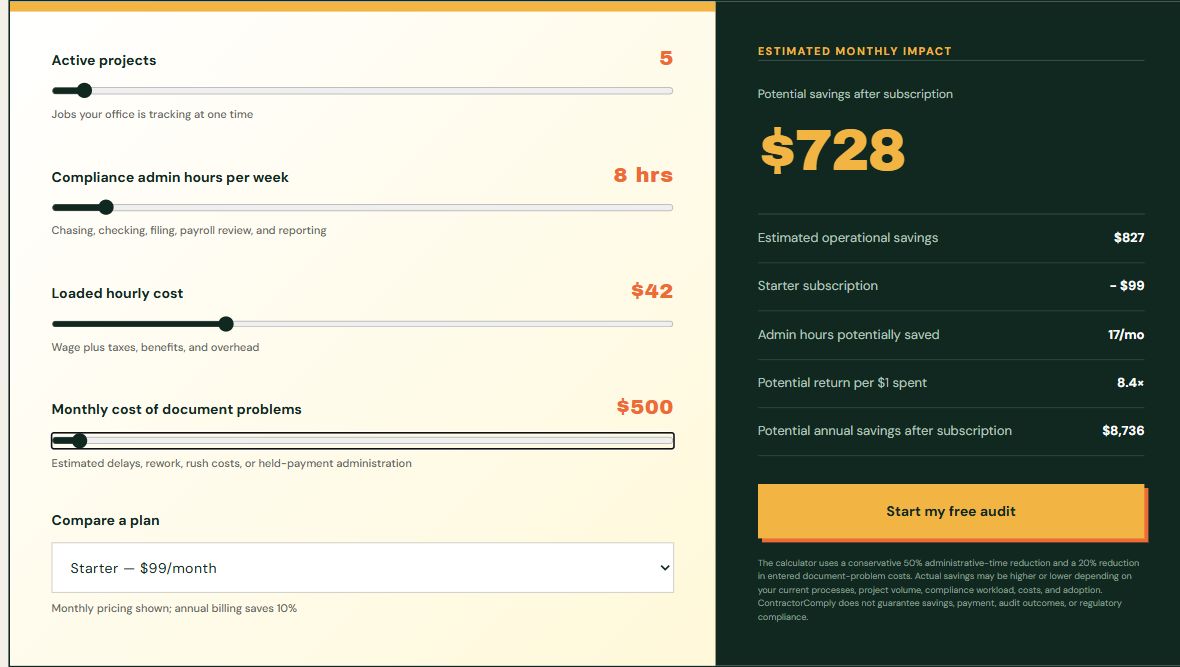
Imagine a small general contractor coordinating five active jobs, a few subcontractors, insurance paperwork, contract requirements, and final handover documents. The owner and office spend an assumed eight total staff-hours each week chasing, checking, filing, and reporting—not eight hours per project. This Starter example does not assume certified-payroll tracking is included.
The loaded hourly cost is $42 in all three examples, including wages, taxes, benefits, and overhead. Monthly document-problem costs are assumed at $500: extra rework, rush costs, delay-related costs, or held-payment administration. This is not an unpaid invoice's face value, and the same admin time should not be counted twice.
Walkthrough: Begin with the company, then add the jobs.
Upload company documents once.
Start with company information, current insurance, a W-9, applicable licenses and certifications, worker qualifications, and other essential records. Confirm the legal company and any performing trade name. Use manual setup, or let optional Builder Agent help build the company profile from the uploaded paperwork.
Review and file reusable records in the Vault.
Builder Agent can propose document types, dates, and filing locations. An authorized company user reviews the draft and confirms what is correct. Save reusable company records in the Compliance Vault and job-specific records with their project. Existing company details are not silently overwritten. A saved file still needs review against each contract's requirements.
Add projects one at a time.
For each job, upload the contract or subcontract, specifications, schedules, and supporting documents. Builder Agent can build out the project and identify proposed requirements and deadlines. Confirm whether you are the GC or a subcontractor, choose the performing trade name, correct missing details, and finish setup. The saved Project Workflow provides the manual alternative.
Reuse applicable documents across jobs.
Apply a current saved master document to the correct project instead of uploading it again. A W-9 or insurance record may support several jobs; project-specific endorsements, limits, owner forms, and dates still need separate review. Collect missing subcontractor records through the secure portal and have an authorized reviewer check the returned forms.
Calculator example · 5 active projects · Starter monthly billing. These settings reproduce the estimate below.
Use ComplyWatch as the daily review list.
Review missing, overdue, expiring, and review-needed items in priority order. Open the underlying record, correct the information, save it, and check that the queue updates. The small office gets the same core daily priority review, without needing to check five sets of folders from scratch. Alerts depend on saved information.
Keep project evidence ready for handover.
Keep the job's reviewed supporting records and completion requirements together as work progresses. At handover, review what is complete and what still needs attention. Certified payroll is not part of this $99 Starter estimate: if a job needs it, compare Essentials, which includes payroll, or the separate payroll option before changing billing. Your team verifies the final package; ContractorComply does not process payroll, establish legal payment entitlement, or certify compliance.
The model assumes a 50% reduction in entered administrative time and a 20% reduction in entered document-problem costs. These are assumptions, not measured outcomes. Project count describes the scenario; entered hours and costs—not project count alone—drive the estimate.
Potential admin time recovered
17 hours/month
Estimated operational savings
$827/month
Starter subscription
− $99/month
Potential savings after subscription*
$728/month
Potential annual savings after subscription*
$8,736/year
Calculation: 8 hours/week × 4.33 weeks/month × $42/hour × 50%, plus $500 × 20%, minus $99/month. Operational savings are rounded to the nearest dollar before subtracting the subscription; annual net savings equal the displayed monthly estimate × 12. Recovered hours are rounded separately.
*Illustrative case-study scenario using the displayed calculator inputs, modeled on common contractor workflows—not a measured customer result. Actual savings vary. Recovered time is potential capacity, not automatic cash savings. Optional AI-provider charges, setup time, and other implementation costs are not included. ContractorComply does not guarantee savings, payment, audit outcomes, or regulatory compliance.
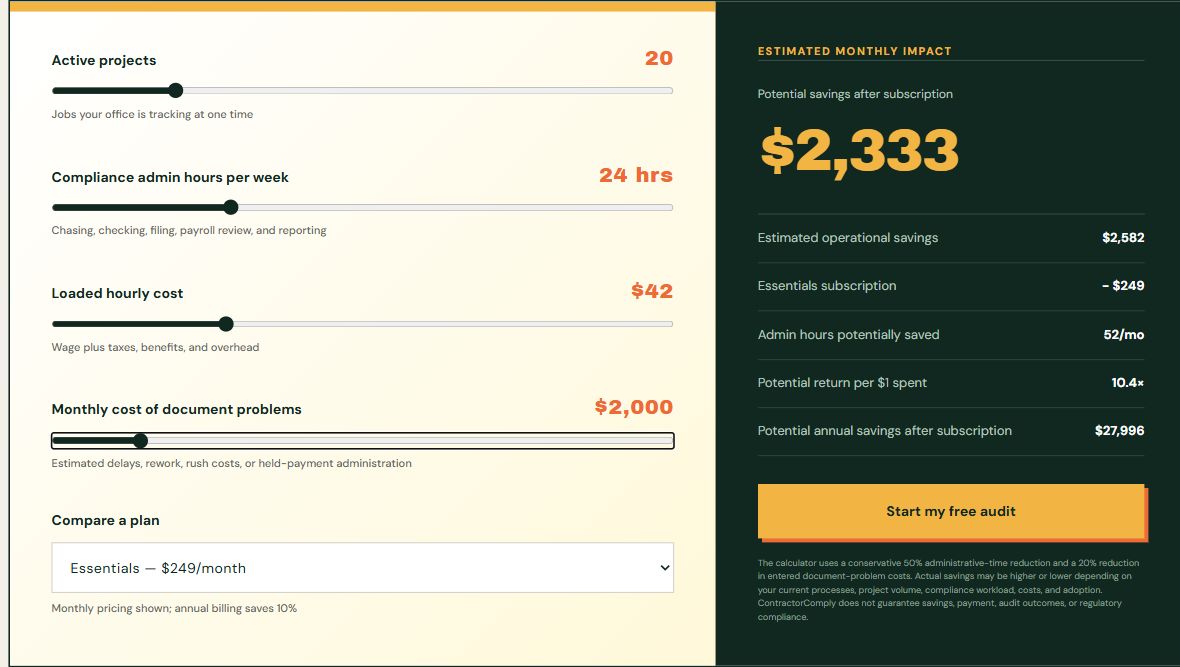
Imagine a growing general contractor coordinating 20 active projects, several subcontractors, insurance renewals, weekly payroll records, and closeout paperwork. The office spends an assumed 24 total staff-hours each week chasing, checking, filing, and reporting—not 24 hours per project.
The loaded hourly cost is $42 in all three examples, including wages, taxes, benefits, and overhead. Monthly document-problem costs are assumed at $2,000: extra rework, rush costs, delay-related costs, or held-payment administration. This is not an unpaid invoice's face value, and the same admin time should not be counted twice.
Walkthrough: Begin with the company, then add the jobs.
Upload company documents once.
Start with company information, current insurance, a W-9, applicable licenses and certifications, worker qualifications, and other essential records. Confirm the legal company and any performing trade name. Use manual setup, or let optional Builder Agent help build the company profile from the uploaded paperwork.
Review and file reusable records in the Vault.
Builder Agent can propose document types, dates, and filing locations. An authorized company user reviews the draft and confirms what is correct. Save reusable company records in the Compliance Vault and job-specific records with their project. Existing company details are not silently overwritten. A saved file still needs review against each contract's requirements.
Add projects one at a time.
For each job, upload the contract or subcontract, specifications, schedules, and supporting documents. Builder Agent can build out the project and identify proposed requirements and deadlines. Confirm whether you are the GC or a subcontractor, choose the performing trade name, correct missing details, and finish setup. The saved Project Workflow provides the manual alternative.
Reuse applicable documents across jobs.
Apply a current saved master document to the correct project instead of uploading it again. A W-9 or insurance record may support several jobs; project-specific endorsements, limits, owner forms, and dates still need separate review. Collect missing subcontractor records through the secure portal and have an authorized reviewer check the returned forms.
Calculator example · 20 active projects · Essentials monthly billing. These settings reproduce the estimate below.
Use ComplyWatch as the daily review list.
Review missing, overdue, expiring, and review-needed items in priority order. Open the underlying record, correct the information, save it, and check that the queue updates. The growing team gets one clear routine instead of checking every folder from scratch. Alerts depend on saved information.
Connect weekly payroll, payment records, and closeout.
For applicable projects, maintain worker classifications and weekly certified-payroll records, review exceptions, and preserve supporting evidence. Review tracked payment prerequisites and gather the correct records in the Closeout Binder. Your team verifies the final package; ContractorComply does not process payroll, establish legal payment entitlement, or certify compliance.
The model assumes a 50% reduction in entered administrative time and a 20% reduction in entered document-problem costs. These are assumptions, not measured outcomes. Project count describes the scenario; entered hours and costs—not project count alone—drive the estimate.
Potential admin time recovered
52 hours/month
Estimated operational savings
$2,582/month
Essentials subscription
− $249/month
Potential savings after subscription*
$2,333/month
Potential annual savings after subscription*
$27,996/year
Calculation: 24 hours/week × 4.33 weeks/month × $42/hour × 50%, plus $2,000 × 20%, minus $249/month. Operational savings are rounded to the nearest dollar before subtracting the subscription; annual net savings equal the displayed monthly estimate × 12. Recovered hours are rounded separately.
*Illustrative case-study scenario using the displayed calculator inputs, modeled on common contractor workflows—not a measured customer result. Actual savings vary. Recovered time is potential capacity, not automatic cash savings. Optional AI-provider charges, setup time, and other implementation costs are not included. ContractorComply does not guarantee savings, payment, audit outcomes, or regulatory compliance.
Higher-Volume General Contractor · 45 Active Projects
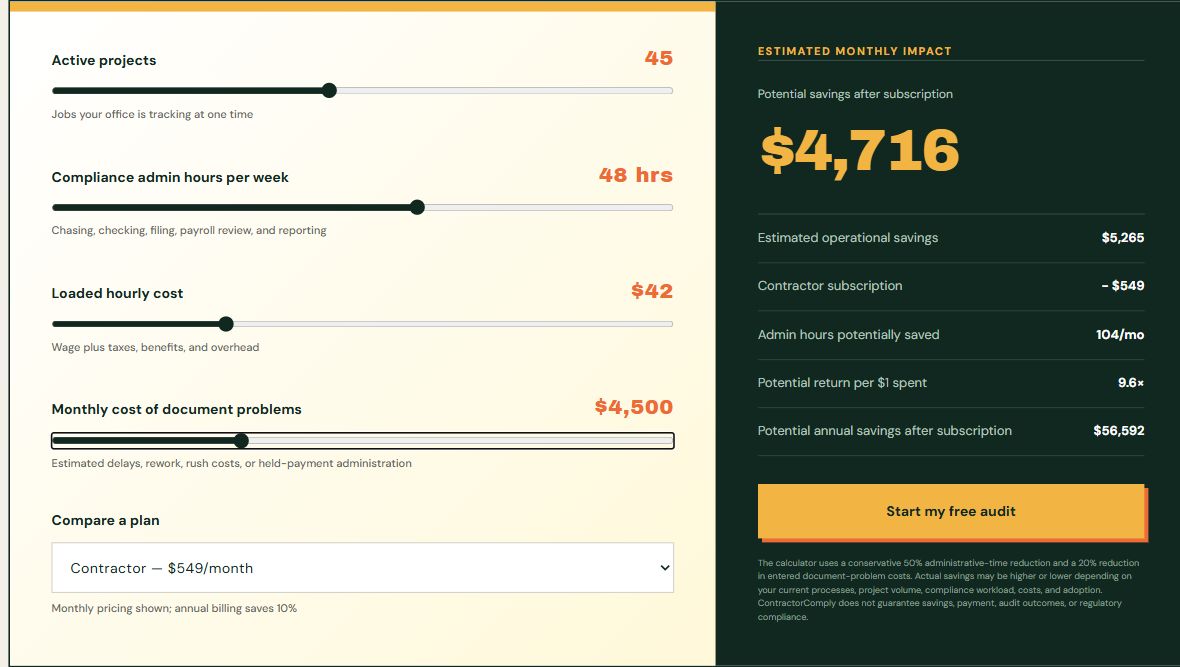
Imagine an established general contractor coordinating 45 active projects across a larger team. Project managers and office staff spend an assumed 48 combined staff-hours each week collecting subcontractor records, reviewing payroll support, checking deadlines, and finding documents for payment and closeout—not 48 hours per project.
The loaded hourly cost is $42 in all three examples, including wages, taxes, benefits, and overhead. Monthly document-problem costs are assumed at $4,500: extra rework, rush costs, delay-related costs, or held-payment administration. This is not an unpaid invoice's face value, and the same admin time should not be counted twice.
Walkthrough: Begin with the company, then add the jobs.
Upload company documents once.
Start with company information, current insurance, a W-9, applicable licenses and certifications, worker qualifications, and other essential records. Confirm the legal company and any performing trade name. Use manual setup, or let optional Builder Agent help build the company profile from the uploaded paperwork.
Review and file reusable records in the Vault.
Builder Agent can propose document types, dates, and filing locations. An authorized company user reviews the draft and confirms what is correct. Save reusable company records in the Compliance Vault and job-specific records with their project. Existing company details are not silently overwritten. A saved file still needs review against each contract's requirements.
Add projects one at a time.
For each job, upload the contract or subcontract, specifications, schedules, and supporting documents. Builder Agent can build out the project and identify proposed requirements and deadlines. Confirm whether you are the GC or a subcontractor, choose the performing trade name, correct missing details, and finish setup. The saved Project Workflow provides the manual alternative.
Reuse applicable documents across jobs.
Apply a current saved master document to the correct project instead of uploading it again. A W-9 or insurance record may support several jobs; project-specific endorsements, limits, owner forms, and dates still need separate review. Collect missing subcontractor records through the secure portal and have an authorized reviewer check the returned forms.
Calculator example · 45 active projects · Contractor monthly billing. These settings reproduce the estimate below.
Use ComplyWatch as the daily review list.
Review missing, overdue, expiring, and review-needed items in priority order. Open the underlying record, correct the information, save it, and check that the queue updates. The larger team follows the same routine across 45 jobs, with clear project ownership instead of a separate spreadsheet for each manager. Alerts depend on saved information.
Connect weekly payroll, payment records, and closeout.
For applicable projects, maintain worker classifications and weekly certified-payroll records, review exceptions, and preserve supporting evidence. Review tracked payment prerequisites and gather the correct records in the Closeout Binder. Your team verifies the final package; ContractorComply does not process payroll, establish legal payment entitlement, or certify compliance.
The model assumes a 50% reduction in entered administrative time and a 20% reduction in entered document-problem costs. These are assumptions, not measured outcomes. Project count describes the scenario; entered hours and costs—not project count alone—drive the estimate.
Potential admin time recovered
104 hours/month
Estimated operational savings
$5,265/month
Contractor subscription
− $549/month
Potential savings after subscription*
$4,716/month
Potential annual savings after subscription*
$56,592/year
Calculation: 48 hours/week × 4.33 weeks/month × $42/hour × 50%, plus $4,500 × 20%, minus $549/month. Operational savings are rounded to the nearest dollar before subtracting the subscription; annual net savings equal the displayed monthly estimate × 12. Recovered hours are rounded separately.
*Illustrative case-study scenario using the displayed calculator inputs, modeled on common contractor workflows—not a measured customer result. Actual savings vary. Recovered time is potential capacity, not automatic cash savings. Optional AI-provider charges, setup time, and other implementation costs are not included. ContractorComply does not guarantee savings, payment, audit outcomes, or regulatory compliance.